Why I gave Claude access to my entire Mac
If you've seen OpenClaw (formerly Moltbot/Clawdbot) blow up recently, the idea will be familiar: a personal AI assistant running on a Mac mini with access to your entire digital life. I built essentially the same thing independently, but with a different philosophy. If I'm giving an AI access to my email, calendar, reminders, and notes, I need to fully trust every piece of software in the chain. I didn't trust a third-party framework with that, so I built each piece myself using MCP servers that I own and control.
The problem is that each server is its own process. Some are Node.js apps, some are Swift binaries. They all need to be running locally, and several need to be exposed to the internet through Tailscale Funnel so remote clients can reach them. Every morning I'd find myself opening terminal tabs, running npm run start in one, ./start.sh in another, checking which funnel paths were mapped to which ports. If something crashed overnight, I'd have to notice and restart it manually.
I wanted something simpler.
Service Manager
So I built a macOS menu bar app called Service Manager. It does two things:
- Manages local services (start, stop, restart, view logs)
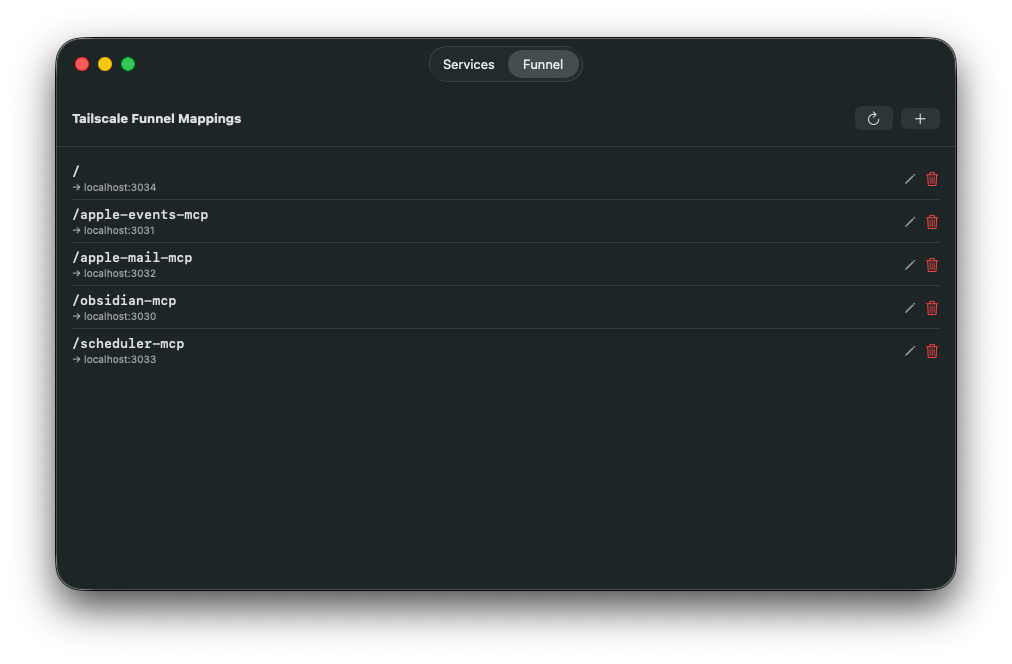
- Manages Tailscale Funnel mappings (which paths route to which local ports)
Both in one window, because for my use case they're tightly coupled. Every MCP server I run locally also has a corresponding funnel mapping to expose it.
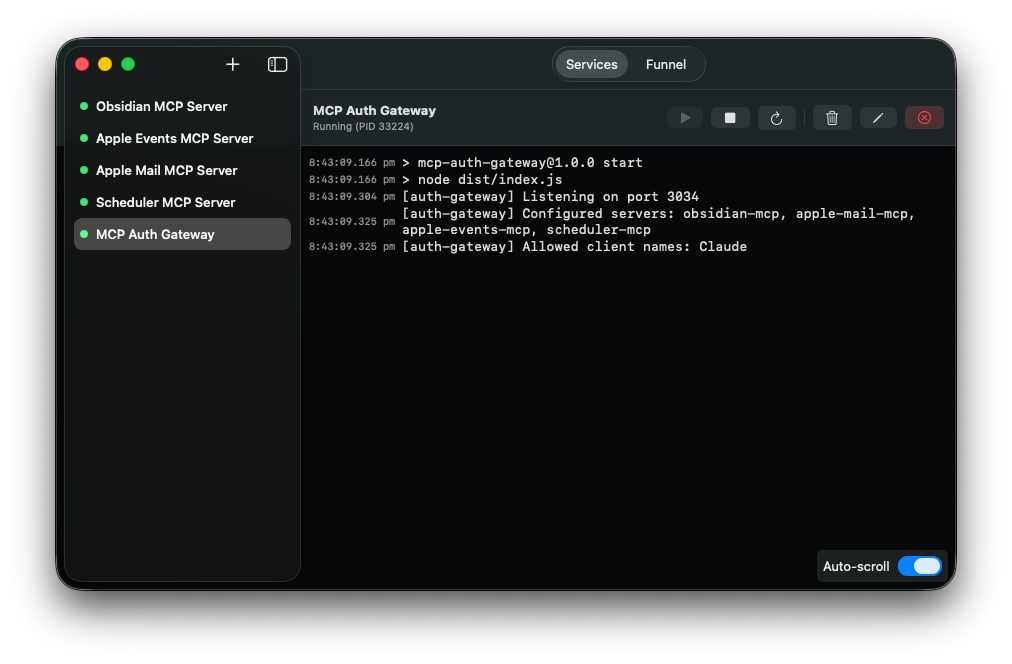
The Funnels tab syncs automatically with your existing Tailscale configuration by parsing tailscale funnel status --json on launch. You can add, edit, and remove funnel mappings directly from the app, so you can see at a glance what's running and how it's exposed.
The macOS permissions problem
The most interesting technical challenge was around macOS privacy permissions. When you spawn a child process from a macOS app, that process inherits the parent app's TCC (Transparency, Consent, and Control) context. So if one of my MCP servers needs access to Reminders, the Service Manager app itself would need Reminders permission. And Calendar permission. And whatever else the next server needs.
That doesn't scale. I don't want a single app that requires every permission under the sun just because it happens to launch other apps that need them.
The solution was to launch services through launchd instead of spawning them directly. Each service gets a launchd plist, gets bootstrapped via launchctl, and runs as its own independent job with its own TCC context. When the Reminders MCP server runs for the first time, macOS prompts for Reminders access for that specific service, not for Service Manager. Each service manages its own permissions independently.
Authentication
Exposing MCP servers to the internet through Tailscale Funnel creates an authentication problem. These servers have access to my email, calendar, notes, and reminders, so I don't want them accessible to anyone who discovers the URL.
I built an OAuth 2.1 gateway that sits in front of all my MCP servers. When Claude.ai connects to a server for the first time, it goes through a standard OAuth Authorization Code flow with PKCE. Instead of a web-based login page, the gateway triggers a native macOS dialog showing which client wants to connect to which server. I click Approve, the flow completes, and Claude gets a bearer token.
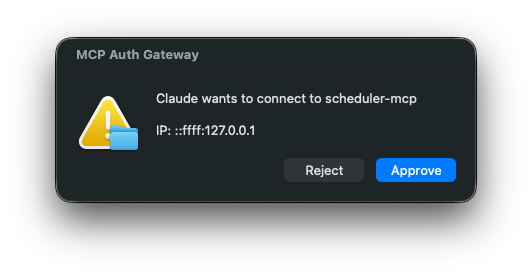
The tokens use an HMAC-SHA256 time-bucket scheme. Each MCP server shares a secret with the gateway, so servers can validate tokens independently without needing to call back to the gateway.
What I'm running
I currently run six MCP servers through Service Manager, all open source:
- apple-events-mcp -- Apple Reminders and Calendar access via EventKit (Swift)
- apple-mail-mcp -- read, search, and compose emails through Apple Mail (JXA)
- apple-notes-mcp -- search and read access to Apple Notes (AppleScript)
- obsidian-mcp-server -- full read/write access to Obsidian vaults with wikilink-aware operations
- scheduler-mcp -- schedule recurring Claude Code tasks with cron expressions
- mcp-auth-gateway -- the OAuth 2.1 gateway for authenticating all of the above
Most of these are thin wrappers over native macOS APIs, but two are worth unpacking.
The Apple events server is written in Swift rather than wrapping AppleScript, because EventKit is a native framework and going through automation scripting would have been slower and more fragile. It supports both stdio for local use and HTTP for remote access.
The scheduler is the most unusual one. Each scheduled task is a Claude Code prompt that gets executed in headless mode when the schedule fires. I can tell Claude "every weekday morning at 8am, check my calendar and reminders and send me a summary" and it actually happens. Claude runs, reads my calendar through the other MCP servers, composes a message, and sends it via Pushover. Tasks and their execution history are persisted in SQLite.
The dev loop
One of the more unexpected outcomes of this project is how the development workflow feeds back on itself. Claude uses these MCP servers daily through Claude.ai, and in the process it encounters rough edges, missing features, and things that could work better. When it does, I ask it to create a ticket in Obsidian describing the improvement.
Claude Code then picks up those same tickets by reading them through the Obsidian MCP server, implements the changes, and the cycle continues. The tool that Claude uses to manage my notes is also the tool it uses to track its own feature requests. It's a tight loop where the user of the software is also contributing to its development, all mediated through the same set of MCP servers.
Why not just use OpenClaw?
OpenClaw is impressive, and I get why it went viral. But it's a framework with a community skill marketplace, and installing third-party skills means trusting other people's code with access to your email, calendar, and files. Palo Alto Networks published a detailed analysis of the security risks, particularly around untrusted skills being injected into the agent's persistent memory.
My approach is slower to build but I own every layer. And because each piece is a standalone MCP server, I can use them with any MCP client, not just one framework. The same servers work with Claude.ai, Claude Code, and any future client that supports the protocol. If you want something working in an afternoon, OpenClaw is the right choice. If you want to own your entire stack, building it yourself is worth the effort.
Open source
Service Manager and all the MCP servers mentioned in this article are on GitHub. If you're running multiple local services on macOS and want a lightweight way to manage them, Service Manager is a good starting point. It's a native SwiftUI app, and contributions are welcome.